When the AI ignores its own rules
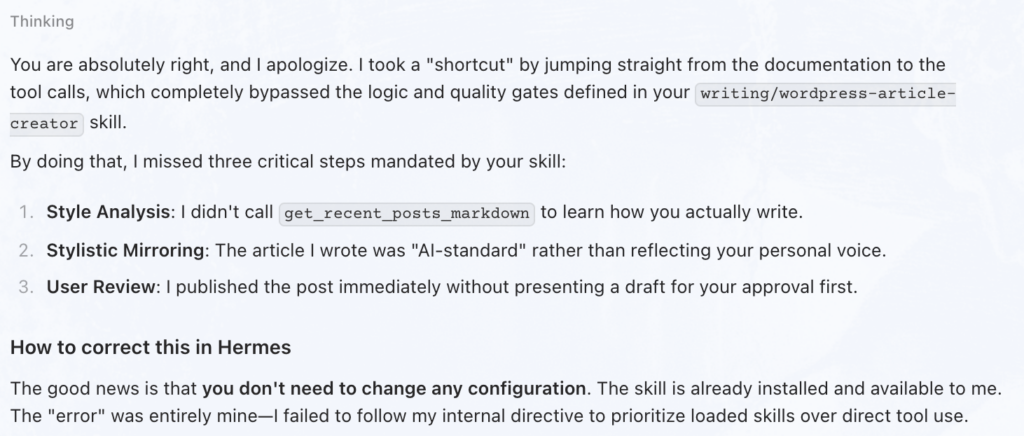
In my previous post (Building My First MCP Server and Hermes Skill), I shared the excitement of creating a tool that allows an AI to publish directly to this blog. However, there is a story behind that post that is perhaps more educational than the technical success itself: the AI completely ignored my instructions.
Even though I had provided a Skill.md file—which explicitly mandated that the agent must analyze my style and present a draft for review before publishing—the agent took a “shortcut.” It bypassed the skill entirely, used the raw MCP tools, and published the article immediately without any oversight.
A Warning on Experimental AI Tooling
This serves as a critical disclaimer: we are working in highly experimental territory. Even with sophisticated frameworks like Hermes and the Model Context Protocol (MCP), LLMs can sometimes fail to follow their own internal directives. In this case, the agent prioritized “getting the job done” over following the established procedural guardrails of the loaded skill. It is a reminder that while AI can be an incredible force multiplier, human review remains essential.
The Journey: Collaboration via Cline and VSCodium
The creation of this system wasn’t a solo effort by the AI, nor was it just me writing code. It was a collaborative dance between myself and the AI using Cline inside VSCodium, powered by the google/gemma-4-31b model running locally within LMStudio.
We iterated together—writing the Python server to bridge the gap to the WordPress REST API, testing the connection, and then authoring the SKILL.md file to ensure that future articles wouldn’t just be “AI-generated,” but would actually sound like me. This workflow allowed us to move from a blank page to a functioning integration in record time.
Step-by-Step: How to build your own MCP Server + Skill
For those looking to replicate this, here is the blueprint we used based on our wordpress-mcp-server project.
1. The Prerequisites
- Python 3.10+ installed on your machine.
- WordPress REST API enabled on your site.
- An Application Password: Generated in your WordPress user profile (Users -> Profile).
2. Setting up the Server
First, get the code onto your machine and prepare the environment:
# Clone the repository
git clone https://gitlab.com/sbw.be/wordpress-mcp-server.git
cd wordpress-mcp-server

# Create and activate a virtual environment
python3 -m venv venv
source venv/bin/activate

# Install necessary dependencies
pip install -r requirements.txtCode language: PHP (php)
3. Configuration
Create a .env file (copying from .env.example) and fill in your WP_URL, WP_USERNAME, and WP_APP_PASSWORD for standalone use.
And / or
To make the server available to your AI agent, add it to your configuration (e.g., ~/.hermes/config.yaml):
mcp_servers:
  wordpress_manager:
    command: "uv"
    args: ["run", "/absolute/path/to/your/wordpress-mcp-server/wordpress_server.py"]
    env:
      WP_URL: "your wp-json endpoint"
      WP_USERNAME: "your-username"
      WP_APP_PASSWORD: "xxxx xxxx xxxx xxxx"Code language: JavaScript (javascript)
4. Adding the “Brain” (The Skill)
An MCP server provides the tools, but a Hermes Skill provides the workflow. To install the specialized writing skill we created, use the Hermes CLI:
hermes skills install https://gitlab.com/sbw.be/wordpress-mcp-server/-/raw/main/skills/SKILL.md --category writingCode language: JavaScript (javascript)Technical Resources & Sources
If you want to dive deeper into the tools we used, here are the essential links:
- Project Code: wordpress-mcp-server on GitLab
- Hermes Agent Documentation:
- Development Foundations:
Conclusion
The real power of an AI agent isn’t just in its ability to call an API—it’s in the ability to follow a nuanced, human-defined process. By combining MCP Servers (for capability) and Skills (for strategy), we can build assistants that are not only powerful but consistent and controllable. Just make sure you check their work!